How to spot a phishing message: the warning signs
Updated · Plixoo
Short answer
A phishing message is a fake email, text or chat message designed to trick you into giving away a password, a login code or money, or into opening a harmful link. The main warning signs are pressure to act fast, a sender address or website name that is slightly wrong, a link whose real address does not match what it says, a request for a password or one-time code, a prize or free item that seems too good to be true, and an attachment you were not expecting. The single safest habit is never to log in through a link in a message: open the app, or type the website address yourself.
The seven warning signs
Scammers send millions of messages, so they rely on a few tricks that work on busy people. Once you know the tricks, most scams become easy to see.
- Urgency: 'your account will be deleted in 24 hours', 'act now'
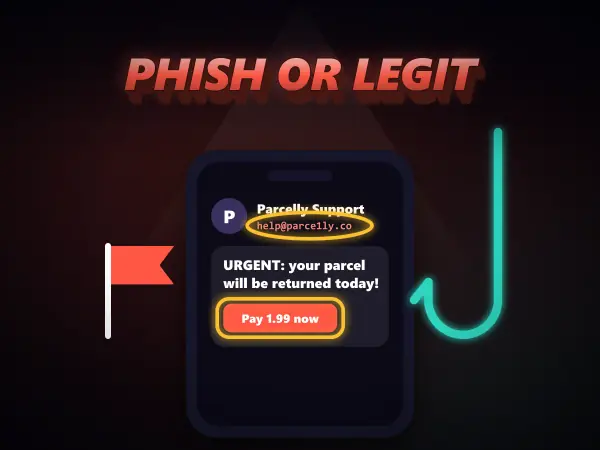
- A sender name that looks right but an address that is not, such as support@parcel-ly-help.com
- A link whose text says one website but whose real address goes somewhere else
- Any request for a password, a PIN or a code that was just texted to you
- Something free or a prize you never entered for
- An unexpected attachment, especially one that asks you to enable anything
- A greeting that does not use your name, and spelling or grammar that feels off
How to check where a link really goes
On a computer, rest the mouse pointer over a link without clicking: the real address appears in the corner of the browser. On a phone, press and hold the link to preview it. Read the part just before the first single slash. In https://login.novabank.com/help the site is novabank.com. In https://novabank.com.account-check.net/help the site is actually account-check.net, and novabank is just a word at the front.
Look-alike spellings are common: rn in place of m, a zero in place of the letter o, or an extra word such as secure, verify or login bolted onto a real name.
Scams aimed at gamers
Games are a favourite target because accounts, skins and in-game currency are worth real money. Watch for offers of free currency or rare items, messages saying your account will be banned unless you 'verify' it, trade offers that move you to another website, and fake giveaways that ask you to log in to claim a prize. No real game company will ever ask for your password in a chat message.
What to do if you clicked
Clicking a link is not the end of the world; typing your details into the page is what does the damage. Close the page without entering anything. If you did type a password, change it straight away from the real app or website, and anywhere else you used the same password. Turn on two-step verification if the account offers it. If you are young, tell a parent or teacher, and report the message using the app's report button so other people are protected too.
Games mentioned here
Frequently asked questions
What is phishing?
Phishing is when someone sends a fake message pretending to be a company, a school, a game or a friend, to trick you into handing over a password, a code, personal details or money. It arrives by email, text message, social media or in-game chat.
Can you get hacked just by opening an email?
Almost never on an up-to-date phone or computer. The danger is in what you do next: clicking a link and typing your details, opening an attachment, or replying with information. Keeping your device updated closes the rare exceptions.
Would a real company ever ask for my password?
No. Real companies never ask for your password or a one-time login code by message, email or phone. A message that asks for either is a scam, however official it looks.
How can kids practise spotting scams safely?
Games like Phish or Legit show realistic fake and genuine messages with invented brands, let the player hunt for the warning signs, and then explain every clue. Practising on examples is much more effective than reading a list of rules.
More guides
The best free online games you can play with no download
Twelve browser games worth your time, sorted by what you actually want out of them.
How to play 2 player games on one phone
No second device, no accounts, no lobby. Just one screen and two people taking turns.
Are browser games safe for kids? What to actually check
The risks in kids' games are rarely the games. Here is what to actually look at.
How to get better at puzzle games
Most puzzle games have a technique. Knowing it beats being clever every time.
Why classic arcade games are still good
Five games from between 1972 and 1984 that nobody has improved on.
What to play when you are bored and cannot decide
Skip the scrolling. Answer two questions and start playing.
How does AI work? Explained for kids (and everyone else)
No metaphors about brains. What an AI actually does, why it gets things wrong, and how to show a child rather than tell them.
The best coding games for kids, and what each one actually teaches
Coding games are good at the part tutorials skip. Here is what each one teaches and where they stop being enough.
How computers actually work, from switches upward
Four layers, bottom to top. None of them are complicated, and together they are the whole machine.
How to make a strong password (and why most advice is wrong)
Length beats symbols, wordlists beat cleverness, and the advice on most sign-up forms is a decade out of date.
How to solve the Tower of Hanoi, and why it teaches recursion
The three-step method that solves any size of tower, the by-hand shortcut, and the idea behind it.
How to learn touch typing: a simple plan that works
Where your fingers go, what to practise first, and how long it really takes.
Morse code alphabet: the chart, the rules and how to learn it
Every letter and number, the timing rules, and the quickest way to learn it by ear.
How does sat nav find the fastest route? Pathfinding explained
The search methods behind sat nav and game AI, and why the clever one checks far fewer roads.