How computers actually work, from switches upward
Updated · Plixoo
Short answer
A computer is billions of switches that are either on or off. Numbers are stored as patterns of those switches, which is what binary means: each position is worth double the one to its right, so 1011 is 8 plus 2 plus 1, or eleven. Small circuits called logic gates combine switches according to fixed rules - AND is on only when both inputs are on, OR when either is - and stacking enough gates together produces addition, comparison and every other instruction a processor can run. Everything above that, including text, images and video, is agreed conventions about what particular patterns of switches mean.
Layer one: everything is switches
The physical reality of a computer chip is a very large number of tiny electronic switches, each of which is either letting current through or not. That is genuinely all the hardware does. A modern processor has tens of billions of them in a space the size of a fingernail.
Nothing in the machine holds a letter, a colour or a sound. It holds patterns of on and off, and every other thing a computer appears to contain is a convention layered on top of that.
Layer two: binary, or how switches become numbers
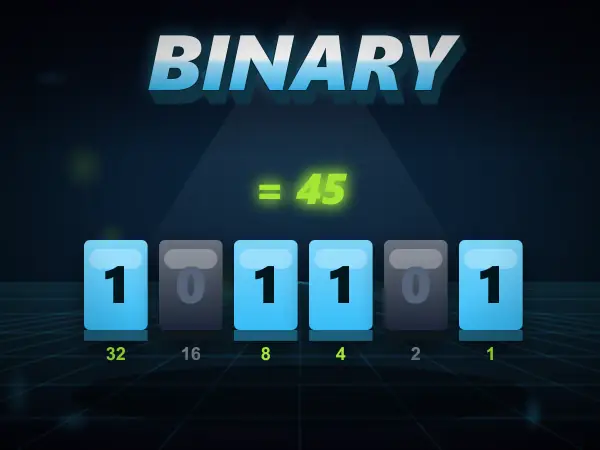
With only two states per switch you cannot store a digit from 0 to 9 in one place, so computers count in base two. Each position is worth twice the position to its right: 1, 2, 4, 8, 16, 32 and so on. To write a number you switch on the positions that add up to it.
Eleven is 8 + 2 + 1, so you turn on the 8, the 2 and the 1 and leave the 4 off, giving 1011. One switch is a bit and eight of them together is a byte, which is why a byte holds values from 0 to 255 - that is every combination of eight on-or-off positions.
People often ask why not base ten. The answer is reliability: building hardware that can tell 'current' from 'no current' is easy and survives electrical noise, while hardware that could reliably distinguish ten different voltage levels would be far more fragile for no benefit.
- A bit is one switch, on or off
- A byte is eight bits, holding 0 to 255
- Each position is worth double the one to its right
- Adding one more bit doubles the range you can store
Layer three: logic gates, or how switches make decisions
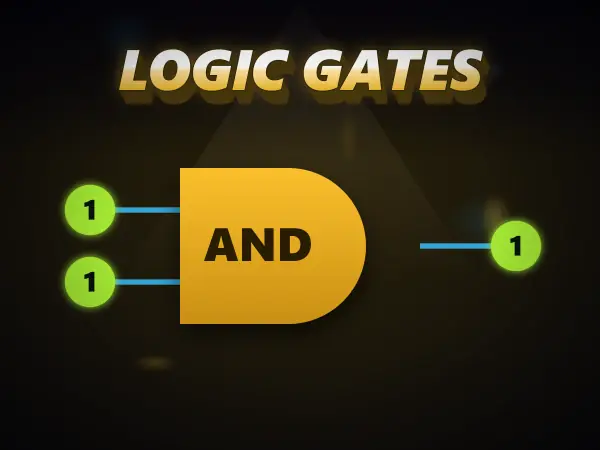
A logic gate is a tiny circuit taking two inputs that are each on or off and producing one output by a fixed rule. There are only a handful worth knowing. AND outputs on only when both inputs are on. OR outputs on when either is. XOR outputs on only when the two inputs are different. NAND and NOR are AND and OR with the answer flipped.
That is the complete vocabulary, and there is no further magic between it and a working processor - only quantity. Wire an XOR and an AND together in the right arrangement and you have built a circuit that adds two bits, including the carry. Repeat that across sixty-four positions and you can add the kind of numbers real software uses.
The reason NAND gets singled out is that every other gate can be built from NAND gates alone, which makes chip manufacturing enormously simpler. A great deal of real hardware is close to being nothing but NAND.
Layer four: how a screen turns numbers into a picture
A screen has no pictures on it. It is a grid of tiny squares called pixels, and each one is told how much red, green and blue light to emit, usually as three numbers from 0 to 255.
Because this is light being added rather than paint being mixed, the results surprise people the first time: red and green light together make yellow, all three at full make white, and all three at zero make black. Equal amounts of all three always give a grey, and the number tells you how bright.
So an image file is a list of numbers describing light, a text file is a list of numbers standing for characters by an agreed table, and an audio file is a list of numbers describing air pressure over time. Everything is numbers, and numbers are patterns of switches.
How the layers fit together
Read the four layers in order and the whole machine is accounted for. Switches hold on and off. Binary makes patterns of switches into numbers. Gates make circuits that compute with those numbers. Conventions decide what particular numbers mean - a colour, a letter, an instruction.
Software is then layers of convention on top of that, all the way up to the page you are reading. There is no point in the stack where something unexplainable happens, which is the single most useful thing to know about computers.
Games mentioned here


Frequently asked questions
How does a computer work, in simple terms?
It stores numbers as patterns of tiny switches that are on or off, and combines those switches with small circuits called logic gates to compute new numbers. Everything else - text, images, sound, programs - is an agreed convention about what particular numbers stand for. There is no step in the chain that cannot be explained.
Why do computers use binary instead of normal numbers?
Because a switch reliably has two states. Distinguishing 'current' from 'no current' is easy and tolerates electrical noise, while distinguishing ten different voltage levels would be far harder and far more error-prone. Two states is the most robust choice available, so everything else is built around it.
What is a logic gate?
A small circuit that takes two inputs, each on or off, and gives one output according to a fixed rule. AND is on only when both inputs are on, OR when at least one is, and XOR only when the two differ. Combining millions of them is how a processor adds, compares and makes decisions.
How does a screen make colours?
Each pixel mixes red, green and blue light, each at a level from 0 to 255. Because light adds rather than subtracts, red and green together give yellow, all three at full give white, and all three at zero give black. Screens use those three colours because human eyes have three kinds of colour receptor roughly tuned to them.
More guides
The best free online games you can play with no download
Twelve browser games worth your time, sorted by what you actually want out of them.
How to play 2 player games on one phone
No second device, no accounts, no lobby. Just one screen and two people taking turns.
Are browser games safe for kids? What to actually check
The risks in kids' games are rarely the games. Here is what to actually look at.
How to get better at puzzle games
Most puzzle games have a technique. Knowing it beats being clever every time.
Why classic arcade games are still good
Five games from between 1972 and 1984 that nobody has improved on.
What to play when you are bored and cannot decide
Skip the scrolling. Answer two questions and start playing.
How does AI work? Explained for kids (and everyone else)
No metaphors about brains. What an AI actually does, why it gets things wrong, and how to show a child rather than tell them.
The best coding games for kids, and what each one actually teaches
Coding games are good at the part tutorials skip. Here is what each one teaches and where they stop being enough.
How to make a strong password (and why most advice is wrong)
Length beats symbols, wordlists beat cleverness, and the advice on most sign-up forms is a decade out of date.
How to solve the Tower of Hanoi, and why it teaches recursion
The three-step method that solves any size of tower, the by-hand shortcut, and the idea behind it.
How to spot a phishing message: the warning signs
The seven signs that give a scam message away, and the one habit that beats almost all of them.
How to learn touch typing: a simple plan that works
Where your fingers go, what to practise first, and how long it really takes.
Morse code alphabet: the chart, the rules and how to learn it
Every letter and number, the timing rules, and the quickest way to learn it by ear.
How does sat nav find the fastest route? Pathfinding explained
The search methods behind sat nav and game AI, and why the clever one checks far fewer roads.