Phish or Legit
Tap any detail to inspect it, press Flag it if it looks wrong, then tap Phish or Legit (P, L and H for hint on a keyboard)
What is Phish or Legit?
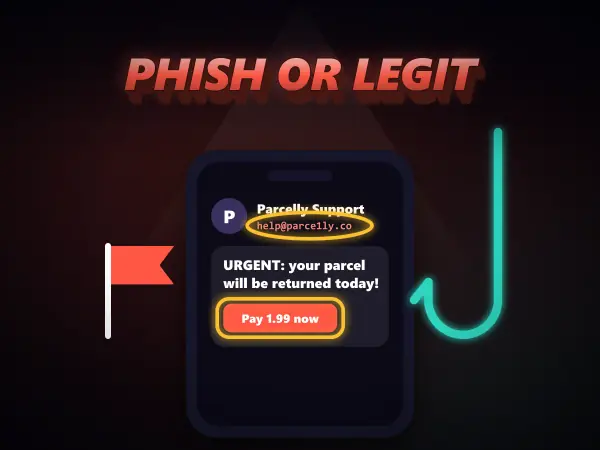
Phish or Legit is a free cybersecurity game that teaches you to spot phishing scams the way you actually meet them. Each round a message arrives on a realistic phone: a text, an email, an in-game chat or a login page. You tap details to inspect them up close, such as the sender's real address or where a link really goes, flag anything suspicious, then decide whether it is a scam or genuine. The reveal circles every red flag with a one-line explanation, and each run ends with five golden rules. Every brand in the game is invented.
How to play Phish or Legit
Controls: Tap any detail to inspect it, press Flag it if it looks wrong, then tap Phish or Legit (P, L and H for hint on a keyboard)
- 1Pick Rookie to start. Read the situation line at the top: it tells you what is going on in your life and the real website of any company involved.
- 2A message arrives on the phone. Tap any part of it, like the sender, a sentence, a link or a button, to inspect it up close.
- 3If a detail looks wrong, press Flag it. Each real red flag you find earns bonus points, but flagging normal parts costs a few.
- 4Decide: tap Phish if it is a scam or Legit if it is safe. Plenty of messages are genuine, so do not flag everything.
- 5The reveal circles every clue on the phone and explains each one. Tap a clue in the list to jump to it.
- 6Stuck? Tap the bulb for a hint that points at the next thing worth checking.
Phish or Legit tips and strategy
- Check the sender first. Compare the address letter by letter with the real site shown in the situation line: look-alikes swap l for 1 or m for rn.
- Always inspect links and buttons before deciding. The words on a button can say anything; the address it really opens is what matters, and the real site is the part just before the first single slash.
- Anything that asks for a password, a login code, a card number or a gift card code is almost always a scam, however friendly or official it looks.
- Do not flag everything to be safe. Normal sentences cost points, and legit messages that match what you are really doing (an order you placed, a code you asked for) are fine.
Phish or Legit FAQ
What is phishing?
Phishing is when a scammer sends a message pretending to be someone you trust, like a bank, a delivery company, a game or a friend, to trick you into giving away a password, a login code or card details, or into opening a harmful file. The name comes from fishing: they cast out lots of bait and wait for someone to bite.
How can you tell if a link is safe?
Look at where it really goes, not what it says. On a phone you can press and hold a link to preview its address. The real website is the part just before the first single slash, so novabank.com.account-verify.co/login belongs to account-verify.co, not NovaBank. When in doubt, skip the link and open the real app or type the site yourself.
Why would anyone ask me for a login code?
A login code sent to your phone is the last lock on your account. If a scammer already knows your username or password, the code is the only thing stopping them, so they invent a story to get you to send it. No real company, game admin or friend ever needs it, which is why genuine codes come with a warning not to share them.
Are the companies in the game real?
No. StreamBox, NovaBank, QuestCraft, Parcelly, Shopnest and every other brand, person and website in the game are invented, and phone numbers use a range reserved for fiction. The tricks are real ones, though: look-alike addresses, fake deadlines, prize bait and requests for codes are exactly what real scams use.